Software for running a shared 9x12 postcard business.
You need to find advertisers, follow up, sell specific spots and get artwork approved. Choose software around those jobs, then check how the work moves from one to the next.
Published by 9x12 Tools, a software vendor in this category. External sources checked . Read the sources and scope.
Start with what you already have
Three ways to put the business together.
A familiar set of tools can work. A dedicated platform can reduce the handoffs. Compare both against one real campaign before moving your business.
01 / Separate tools
Keep a stack you know.
Good fit if you want control over each tool. Canva provides postcard design tools; Airtable supports configurable sales and contact workflows. You can combine tools like these with your payment provider and mailing arrangements.
The work to plan: connect the advertiser, placement, payment and approved artwork. Decide who updates each record when a sale or a change happens.
02 / Specialist alternatives
Start with a tool built for shared cards.
EDDM Drop Pro explicitly serves 9x12 and co-op campaign organizers. Its current public site presents Version 2 and advertises free access. That makes it a relevant option to investigate if subscription cost is your first constraint.
Its public page does not establish a detailed feature-by-feature comparison. We have not tested its signed-in workflow. Ask how it handles spot reservations, payments, lead sourcing and versioned proofs before assuming a feature is included or absent.
Good fit if you want the card, routes, prospects and sales in one workspace. Saving routes starts prospect generation. The campaign creates its website, and online sales connect the paid placement to advertiser intake and artwork review.
Build, preview and publish free, and work the first 50 generated leads. Subscribe to take advertiser payments, connect your own domain and access unlimited leads. Arrange print and mail fulfillment separately.
A list of features is a starting point. These questions show whether the pieces work together for the way you run a card.
01
Find advertisers
Businesses in the area you plan to mail, with contact details and a next step.
Ask to see itWhere do the prospects come from? What happens after a call or follow-up?
02
Plan the card & routes
A readable layout, household counts, spot prices and a mailing budget.
Ask to see itCan you change the layout or routes without rebuilding the campaign elsewhere?
03
Sell a specific spot
A price, an available placement and a clear record of money collected.
Ask to see itWhen an advertiser pays, does that exact spot become unavailable?
04
Collect details & approve artwork
The advertiser’s offer, contact details and a decision on the current proof.
Ask to see itCan you tell which artwork version was approved, and by whom?
05
Prepare the mailing
Printer specifications, route paperwork and a provider or preparation plan.
Ask to see itWho handles printing, bundling and postal delivery, and what does the quote include?
Keep the budget separate from the subscription. Use the shared-card cost calculator to estimate printing, postage and the ad spots needed to cover that subtotal. Include your other expenses for full business break-even.
Inside 9x12 Tools
Keep the next conversation beside the last one.
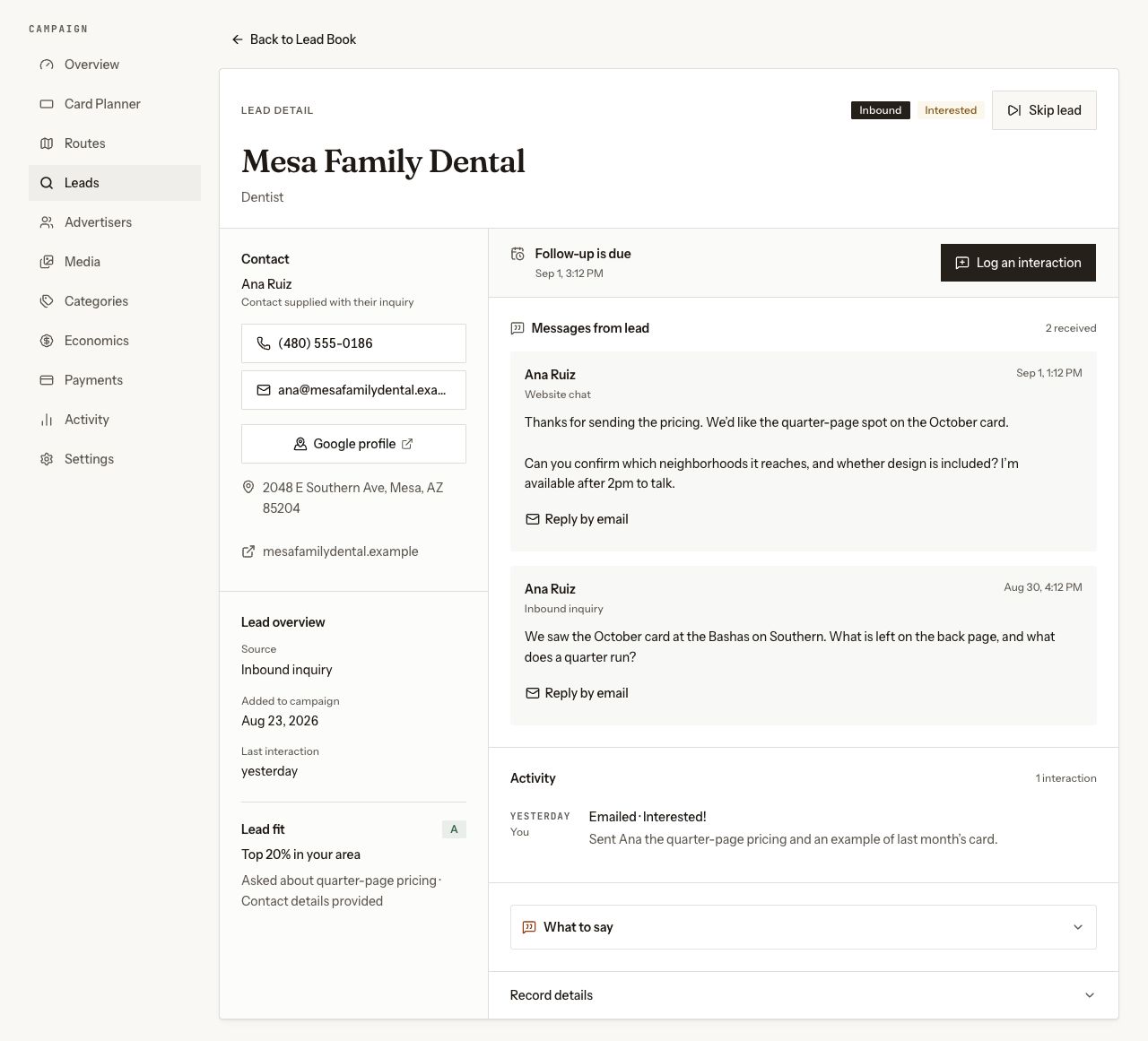
The Lead Book holds the advertiser’s contact details, inquiries, logged outreach and next follow-up. The work queue helps you choose whom to contact next.
After a sale, a private advertiser workspace collects details and keeps proof approval attached to the current artwork version.
Create, preview and publish free. Subscribe to take payments, connect your own domain and access unlimited leads.
The lead record keeps inquiries and logged outreach with the next follow-up. Current app components with sample data; website chat depends on availability and account setup. Select the image to see it full size.
Already have a shortlist?
Compare the products by name.
9x12 Method CRM, 9x12 CRM and 9x12 Agency CRM are separate products. Each comparison explains the alternative’s strengths, published details and what to check for your campaign.
Still not covered? Ask directly and you will get a reply from a person who runs these campaigns.
What software do I need for a shared 9x12 postcard business?
Cover prospecting and follow-ups, card layout, mail routes, spot pricing, payments and artwork approvals. You can assemble separate tools or use campaign software that connects those jobs. Confirm printing and mailing arrangements separately; software access does not mean fulfillment is included.
Can I run it with Canva and a spreadsheet?
Yes, you can assemble your own workflow. Use a design tool for artwork and a spreadsheet or CRM for advertisers, spots and follow-ups. Decide how payments update availability, where advertiser details live and how you record proof approval. Those handoffs need a process even when the individual tools are familiar.
Is there free 9x12 postcard software?
EDDM Drop Pro advertises free access on its public site; check its current terms and workflow directly. In 9x12 Tools, campaign building, route selection, spot pricing, preview, publishing and the first 50 generated leads are free. Subscribe to take advertiser payments, connect your own domain and access unlimited leads.
Does 9x12 Tools print and mail the cards?
No. Arrange printing and mailing preparation with your own providers. Print fulfillment is not available through 9x12 Tools today. Include printing, postage, preparation and other operating expenses when comparing the total cost of running a campaign.
Sources and scope
External product descriptions were checked against the vendors’ public pages on : Canva (https://www.canva.com/create/postcards/), Airtable (https://www.airtable.com/solutions/sales) and EDDM Drop Pro (https://eddmdroppro.com/). Their terms and features can change. This guide is our assessment as the maker of 9x12 Tools, not an independent product ranking.