Prospects, follow-ups and sales
A CRM for the work of filling a 9x12 postcard.
Save the routes. Find businesses to contact. Keep the next conversation, purchased spot and advertiser approval connected to the campaign.
By Dustin Myers · Sources and corrections
Last updated
A community card needs businesses willing to buy placements. Keeping their names organized helps, but there is work on both sides of that contact list: finding suitable prospects, following up, collecting payment and getting the advertiser’s artwork approved.
9x12 Tools connects those jobs to the card and its mailing area. Here is what that looks like in the current app.
Save routes to start prospect discovery
Choose the EDDM routes for your campaign and save them. The app starts finding local businesses in the campaign area, deduplicates them, scores their fit and builds a ranked queue with available contact details. The reasoning behind the score helps you decide what to investigate. You can adjust the target categories as you learn which businesses suit the mailing.
Your first 50 generated leads are workable free. Paid plans continue discovery in batches as you work through prospects, subject to the businesses available in the area. This is an ongoing prospecting workflow; the app does not promise an unlimited database delivered upfront.
A high score is a starting point for research. Check the business’s service area, offer and capacity yourself before pitching.
Work the queue; search the Lead Book
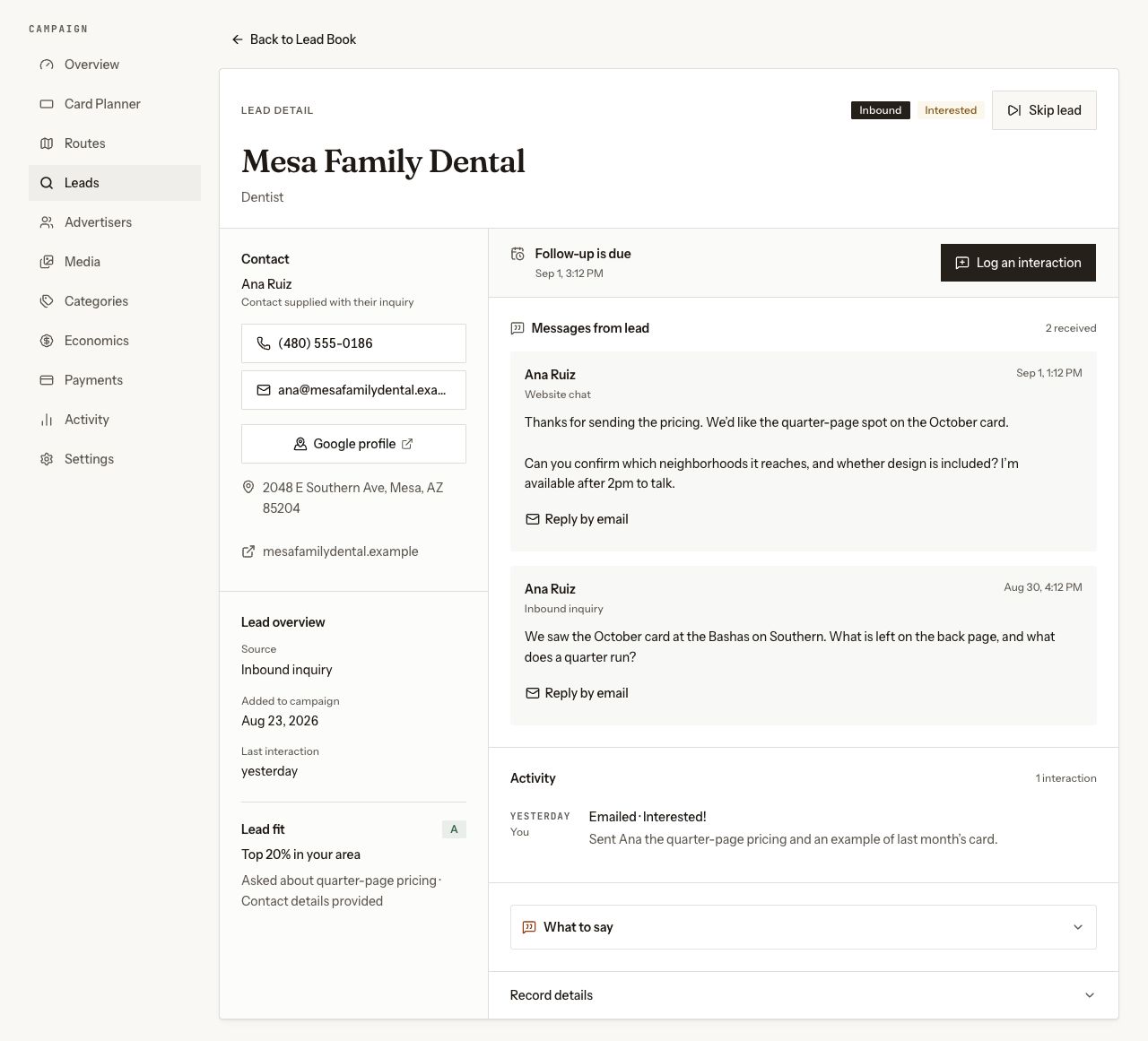
The Work queue brings the next prospect or due follow-up forward. The Lead Book lets you search and filter relationships when you already know whom you want to find. Open a lead to see contact details, inquiries, logged outreach, invitations and a linked sale.
Log what happened after a call. An interested conversation schedules a follow-up; a no-answer or not-now outcome gets a different next action. The relationship becomes won through a completed sale. That keeps the record clear about who is interested and who has bought a placement.
Get help preparing outreach
Call guidance and editable email drafts give you a starting point. Review the message, check the business details and make the offer specific to the campaign. Email drafts open in your own mail application for you to send. That handoff does not synchronize your inbox or establish that an email was delivered.
If you already have contacts, paid CSV import brings them into the campaign workflow. Use the import preview to check mappings and duplicates before committing the list.
Connect the invitation to the purchased spot
Build and price the card, then use its campaign and prospect pages to show the placement you are offering. Advertiser checkout is attached to the actual spot. A successful purchase connects the buyer, payment, sold inventory and lead record, so you can see which conversation became a sale.
Publishing is free. Checkout and reservations require a paid plan. Advertiser payments use your connected Stripe account. Plan your printing, postage and other delivery costs separately; collecting money is one step in fulfilling the mailing you sold.
Keep artwork approval with the placement
After the sale, the advertiser has a private workspace for placement details and artwork review. They can approve the current proof or request changes with notes. Their response belongs to that version, so replacing the artwork requires review of the new proof.
This is the wider workflow to evaluate when choosing a CRM for the 9x12 method. If your main need is organizing contacts through custom sales stages, compare that directly. If your missing steps are finding prospects and carrying a purchase through approval, try those handoffs with a sample campaign.
Compare the right product
9x12 Method CRM, 9x12 CRM and 9x12 Agency CRM are different products. Our comparisons identify the public website being reviewed, describe the other product’s strengths and separate advertised features from questions to test during a trial.
For 9x12 Tools, start with the free card builder, routes, preview, publishing and first leads. Check current plans for checkout, reservations, domains and imports. Printing and mailing fulfillment remain on the roadmap.
The screenshot above uses current app components with sample records. It shows the interface, not customer results.
Straight answers
Before you ask.
Still not covered? Ask directly and you will get a reply from a person who runs these campaigns.
Does 9x12 Tools find prospects or just store contacts?
Saving EDDM routes starts automatic discovery, scoring and ranking of local business prospects. You can work generated leads in the queue, search the Lead Book and import existing contacts on a paid plan. You still qualify businesses and do the outreach.
Can I use it as my 9x12 CRM?
It provides a Lead Book, work queue and relationship records with inquiries, logged outreach, invitations and linked sales. Follow-ups come from outreach outcomes. If your process requires custom Kanban stages or a synchronized email inbox, evaluate those requirements separately.
Does the software send outreach emails automatically?
No. It helps draft an email and opens the draft in your mail app for you to review and send. Opening a draft does not prove delivery, and the feature does not synchronize your inbox.
Can an advertiser approve artwork?
Yes. A private placement workspace lets the advertiser review the current artwork, approve it or request changes with notes. The response belongs to that artwork version.
Start with your mailing area.
Build your card, choose routes, work your first leads and publish free. A paid plan is required to take advertiser payments, connect your own domain and access unlimited leads.